Introducing Balance
A will says who gets what. It does not say what there is. Balance shows everything you own and owe in one place, and puts it in the right hands when the time comes.
When someone dies, their family needs two things almost immediately. The first is the documents: the will, the policies, the deed. The second is harder, and almost nobody prepares it. It is the answer to a plain question: what is there?
Keepacy™ has always handled the first. Today we are adding the second. It is called Balance.
The list that lives in one person's head
Most households do not have a list of their accounts. They have a person. One spouse knows about the old 401(k) from two jobs ago, the brokerage account opened in 2014, the line of credit on the house, the savings account at the bank across town. Nothing is hidden. It is simply never written down, because the person who knows it has never needed to look it up.
Then that person is gone, and the family rebuilds the list the slow way: watching the mail, reading old tax returns, calling institutions one at a time to ask whether an account exists. It takes months. Some accounts are found years later. Some are never found.
A will says who gets what. It does not say what there is.
What Balance does
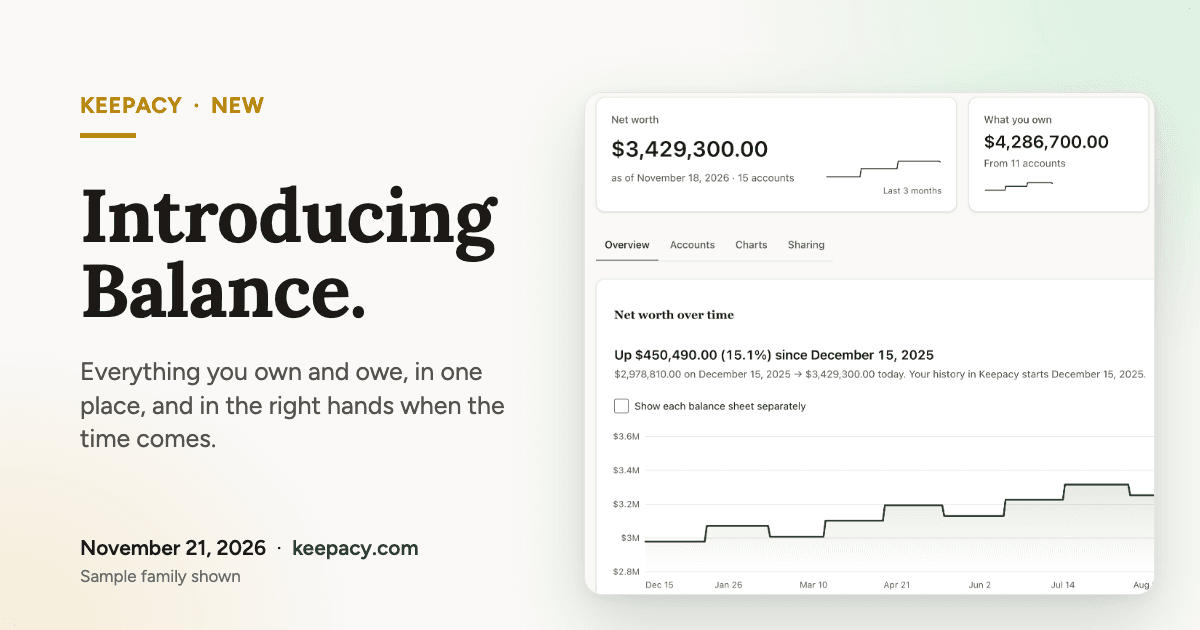
Balance shows your accounts and what they are worth, in one place. In plain terms:
- Link your bank, credit card, investment, loan and mortgage accounts through Plaid, a service many financial apps use to connect to banks. Keepacy updates their balances each night, and when you ask.
- Add the rest by hand, like the house, a car or a loan to a family member.
- See three numbers at the top: your net worth, what you own, and what you owe, with the date they are from.
- See the investments inside each account, with their values and what you paid for them (cost basis).
- Watch it change. Your history starts the day you add an account, and the page shows how your net worth has moved since.
You can also group accounts, such as retirement or real estate, and build your own charts and metrics, such as what you owe as a share of what you own, or how many months your cash would last.
Trusts and businesses get their own balance sheet
If you own part of a business, or you have put assets into a trust, a single household total is the wrong picture. On the Holdings plan, each trust and business has its own balance sheet. You set your share of each one, and your net worth counts only that share. Look at one balance sheet alone, or all of them together.
The part budgeting apps leave out
There are other tools that add up your accounts. They are built for you, while you are here. We built Balance around a different question: who sees this when you cannot show them?
In Balance, you choose who receives each balance sheet. Your personal accounts can go to your spouse. The business can go to your partner or your eldest. The trust can go to its trustee. You pick from the people you have already added as beneficiaries. Until you choose someone, nobody receives it.
And it follows the same rule as everything else in Keepacy: nothing is released while you are responding to your check-ins. When your vault is released, the people you chose see the accounts, the balances recorded for them, and the investments held in them. They start with a list instead of a search.
If you add Balance to your Legacy Card, whoever holds the card and knows your answers can see it too, once your vault is released and they have completed an ID check.
A will says who gets what. Balance says what there is, and where to find it.
How your accounts are linked, and what we can see
We would rather tell you exactly how this works than ask you to take it on faith.
- You sign in to your bank in a window run by Plaid. Keepacy never sees or stores your bank password.
- The link is read-only. Keepacy reads balances and holdings. It cannot move money, pay anyone, or make a trade. Most banks can be linked only with Plaid's transactions service turned on, so Plaid's screen lists transactions and Plaid collects them on its side. Keepacy never fetches or stores them.
- Balance works differently from your documents. Your documents are encrypted on your device, and our servers hold no key that can open them. Balances and holdings arrive at our servers from Plaid, and we encrypt them before storing them. Our security page says this plainly.
- You can remove a connection. The updates stop, and we delete its accounts and every balance and holding recorded for them, so nobody receives them. This cannot be undone.
One more honest note. The figures in Balance come from your financial institutions, or from what you typed in, and are for the date shown. They can be late or wrong. Balance is a picture of what you have, not financial, tax or investment advice.
What it costs
Balance is part of both paid plans. If you are new to a paid plan, either one starts with 30 days free, one trial per account. You add a card to start, and we charge it when the trial ends unless you cancel first.
- Personal: $9.99 a month or $89 a year. Balance with up to 5 connections. A connection is one sign-in at a bank or other company, however many accounts you have there.
- Holdings: $49.99 a month or $490 a year. Balance with no limit on connections, plus a balance sheet for each trust and business.
You can start on Personal and move to Holdings later.
Where to start
Link one account tonight: the one your family would have the hardest time finding. That is enough to begin. The list gets better every time you add to it, and the history starts counting from today.
Thank you to the early users who tested Balance and told us where it was confusing. It is simpler because of you.
See Balance and the plans at keepacy.com/pricing.
Start your free vault
Centralize your most important documents and decide who gets access — only when it matters.
Create your free vault